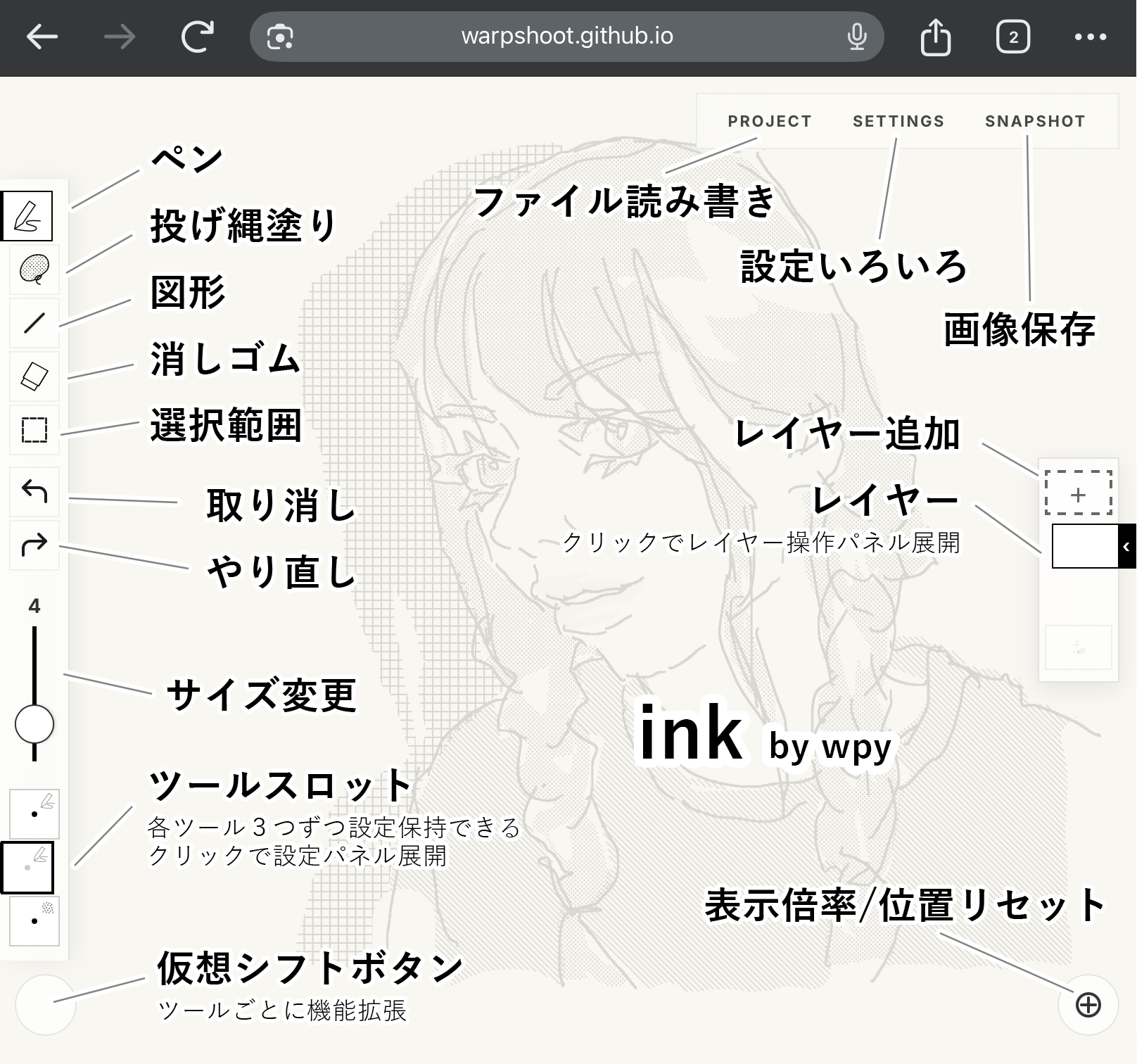
ink ユーザーガイド
「ink」は、描き心地の良さと動作の軽さを追求した、Webブラウザで動くペイントツールです。
1. 基本コンセプト
気持ちいい描き心地と、シンプルで軽快な動作を特徴としています。ペン描画、塗りつぶし、スクリーントーンなどの機能を備え、ストレスのない自由なドローイング体験を提供します。
2. モードとツール
画面左のツールバーで5つのメインモードを切り替えます。
ペンモード (Pen)
- ペン: 標準的なペンツール。筆圧による太さの変化やアンチエイリアスの有無を設定可能です。
- 点描 (Stipple): ペンの筆圧に合わせて点の密度が変わる描画ツール。
塗りモード (Fill/Lasso)
- 投げ縄塗り (Fill): 囲んだ範囲を塗りつぶします。
- トーン (Screentone): 囲んだ範囲にスクリーントーンを配置。豊富なパターンから選択可能。
- バケツ (Bucket): 各ツールの設定パネルで「バケツ有効」にすると、クリックによる塗りつぶしが可能です。
図形モード (Shape)
ドラッグで幾何学図形を描きます。スロットをタップして設定パネルを開きます。
- 直線: 始点から終点まで直線を引きます。Shift を押しながらドラッグすると 45° スナップ。
- 矩形: 対角にドラッグして長方形を描きます。Shift で正方形に。
- 円: ドラッグした領域に内接する楕円を描きます。Shift で真円に。
- 多角形 (Poly): 正多角形。角数は設定パネルで変更可。
- スター (Star): 星形。角数・内径比率を設定パネルで変更可。
設定オプション:
- 塗りつぶし / 線描き: 塗りと輪郭線を個別に ON/OFF。直線は塗りなし(グレーアウト)。
- 中心から描画: ON にするとドラッグ開始点が図形の中心になります。
- 角度: 図形の回転角度を 0〜359° で指定。直線には適用されません。
- アンチエイリアス: 輪郭のギザギザを滑らかにします。
- プレビュー: 設定変更・線幅スライダー操作後、画面中央に 2 秒間プレビューが表示されます。
消しゴムモード (Eraser)
- 消しゴムペン: ブラシでなぞった部分を消去。
- 投げ縄消去: 囲んだ範囲を一気に消去。
- 全消し: 選択中のレイヤーを即座にクリアします。
選択モード (Select)
- 矩形選択 (Rect) / 投げ縄選択 (Lasso): 範囲を指定して、以下の操作が可能です。
- 移動: 選択したピクセルをドラッグで移動。
- コピー/カット/ペースト: 他のレイヤーへの複製や切り取り。
- 削除: 選択範囲をクリアします。
- 解除: 選択を解除してキャンバスに確定させます。
3. 高度な描画支援
手ぶれ補正 (糸引きスタビライザー)
ペンや消しゴムの設定パネルから有効化できます。糸で引くような独特な操作感(String-pulling)により、震えを抑えた非常に滑らかな線を描くことができます。
レイヤー機能
最大5枚のレイヤーを管理できます。レイヤーボタンをクリック(または長押し)すると、不透明度調整、表示切り替え、上下移動、下のレイヤーと統合、レイヤー削除のメニューが表示されます。
4. プロジェクト管理
画面右上の「PROJECT」メニューから操作します。
- 新規プロジェクト: キャンバスをリセットし、新しい作業を開始。
- プロジェクトの保存/読み込み: 作業状態を .json 形式でローカルに保存・復元できます(ドラッグ&ドロップでも読み込み可能)。
- PSD形式で書き出し: レイヤー構造を維持したまま Adobe Photoshop 形式(PSD)でエクスポートします。
5. 操作ガイド
タッチ / ジェスチャー
- 1本指: 描画 / 投げ縄選択
- 2本指タップ: 元に戻す (Undo)
- 3本指タップ: やり直し (Redo)
- ピンチ・スワイプ: ズームと移動
キーボードショートカット
- X: ペンと消しゴムの切り替え
- S: アクティブなツールの手振れ補正 ON/OFF
- Space + ドラッグ: キャンバスの移動 (Pan)
- Ctrl + Z: Undo / Ctrl + Y (or Shift+Ctrl+Z): Redo
- Ctrl + C / X / V: 選択範囲のコピー / カット / ペースト
- Delete / Backspace: 選択範囲の削除
- Esc: 設定メニューを閉じる / 選択の解除
- Ctrl + S: 保存(Snapshot)メニューを開く
6. 保存と書き出し (Snapshot)
- Canvas (Full): キャンバス全体の画像を保存。
- Crop (Range): 指定した範囲だけを切り出して保存。
- 背景透過: 背景を透明にして書き出すか選択。
- 拡大率 (Scale): 1X, 2X, 3X の解像度で書き出し可能。
7. クレジット
2026-04-17 Updated
ink User Guide
"ink" is a web-based paint tool focused on a smooth drawing experience and lightweight operation.
1. Core Concept
It features an enjoyable drawing experience and simple, lightweight operation. Equipped with pen drawing, filling, and screentones, it provides a stress-free and smooth drawing experience.
2. Modes and Tools
Switch between five main modes using the toolbar on the left.
Pen Mode
- Pen: A standard pen tool. Configure thickness changes based on pressure and anti-aliasing.
- Stipple: Dot density changes according to pen pressure.
Fill Mode
- Lasso Fill: Fills the enclosed area.
- Tone (Screentone): Places screentones in the enclosed area. Select from a variety of patterns.
- Bucket: Enable "Bucket" in the settings panel to fill areas by tapping.
Shape Mode
Draw geometric shapes by dragging. Tap a slot to open the settings panel.
- Line: Draws a straight line. Hold Shift to snap to 45°.
- Rectangle: Drag diagonally. Hold Shift for a square.
- Circle: Draws an ellipse. Hold Shift for a perfect circle.
- Polygon: Regular polygon. Change sides in the settings panel.
- Star: Adjust sides and inner radius ratio in the settings panel.
Settings Options:
- Fill / Stroke: Toggle fill and outline independently.
- Draw from Center: The drag start point becomes the center of the shape.
- Rotation: Set rotation angle from 0–359°.
- Anti-aliasing: Smooths jagged edges.
- Preview: A 2-second preview appears after changing settings.
Eraser Mode
- Eraser Pen: Erases the traced area.
- Lasso Erase: Erases the enclosed area.
- Clear All: Instantly clears the selected layer.
Select Mode
- Rect / Lasso: Specify a range for operations.
- Move: Move selected pixels by dragging.
- Copy/Cut/Paste: Duplicate or cut to other layers.
- Delete: Clears the selection.
- Deselect: Commits changes to the canvas.
3. Advanced Features
Stabilizer (String-pulling)
Enable from the Pen or Eraser settings panel. Uses a "string-pulling" mechanism to draw extremely smooth lines.
Layers
Manage up to 5 layers. Click (or long-press) a layer button for opacity, visibility, reorder, merge, and delete options.
4. Project Management
- New Project: Resets the canvas.
- Save/Load: Save and restore work in .json format (drag-and-drop supported).
- Export PSD: Exports in PSD format maintaining layer structure.
5. Shortcuts & Gestures
Touch / Gestures
- 1-Finger: Draw / Lasso Selection
- 2-Finger Tap: Undo
- 3-Finger Tap: Redo
- Pinch & Swipe: Zoom and Pan
Keyboard Shortcuts
- X: Toggle Pen / Eraser
- S: Toggle Stabilizer
- Space + Drag: Pan canvas
- Ctrl + Z: Undo / Ctrl + Y: Redo
- Ctrl + C / X / V: Copy / Cut / Paste
- Delete / Backspace: Delete selection
- Esc: Close menus / Deselect
- Ctrl + S: Open Snapshot menu
6. Export (Snapshot)
- Canvas (Full): Saves the entire canvas.
- Crop (Range): Saves a specified area.
- Transparent Background: Export with transparent background.
- Scale: Export at 1X, 2X, or 3X resolution.
7. Credits
2026-04-17 Updated